
Graphic Design Practices (App)
App Design
First ideas:
- Pub App – Best pint, Best food, Best music, Biggest/Smallest pub.


^Here is an example of an Ireland Pub App. “Irish Pubs” app is used to find pubs near you. Most popular and highest rated pubs in Ireland. This app would be handy for tourists but only gives the name, location and small description of the pub. I would like my app to be more detailed and specific, rate the pub in terms of standard of pints, food, entertainment etc.
- Best Hikes, Walks, Viewpoints – Most popular hiking/walking routes in Ireland. Ranked in difficulty. Best viewpoints.


^Here is an example of a Hiking/Walking app. “AllTrails” uses your location and shows routes near you. I really like this app and use it myself, i like how it rates the difficulty from hard – moderate – easy, and how you can look at reviews and pictures from other users.
NAMES:
Adventures Ireland
Best Hiking Routes in Ireland:
Mountain Routes:
- Carrauntoohil Mountain, MacGillycuddy’s Reeks, Kerry (13km, 6 hrs) – this travel offers multiple routes and is noted to be a strenuous but rewarding walking route.
- Slieve Donard Mountain Walking Route, Co. Down (9km, 5 hrs) – this trail is noted to be a moderate to strenuous walk that is a rather straighforward climb; if you choose to do this trail make sure you go on a clear and sunny day so that you can the Isle of Man, Wicklow Mountains, Wales and Scotland in the surrounding areas.
- Errigal Mountain and Mackoght Loop Trail, Co. Donegal (6km, 3.5 hrs) – is considered to be a moderate to strenuous trail and is known for its’ iconic peak at the top of the Errigal Mountain.
- Lugnaquilla Mountain, Glenmalure Loop Walk, Co. Wicklow (15km, 6 hrs) – is a very strenuous walking route to the summit of the popular Lugnaquilla Mountain, but has incredible panoramic views over the Wicklow Mountains, Glen of Imaal, Glendalough and Glenmalure.
- Croagh Patrick Mountain Walk, Pilgrim Path, Westport, Co. Mayo (7km, 3.5 hrs) – is a moderate to strenuous walking trail that takes you to the popular and spectacular peak of Croagh Patrick Mountain.
Coastal Routes:
- Bray Head Loop Walk, Valentia Island, Kerry (6.8km, 3hrs) – moderate walking trail that takes you along the coastline and has incredible views of the Skellig Islands, the Kerry Coast and the Wild Atlantic Way along the way
- Causeway Coastal Path Walking Route, Co. Antrim (16km, 4 hrs) – is a moderate coastal walk from the Carrick a Rede Rope Bridge to Giants Causeway.
- Howth Cliff Path Loop Walk, near Dublin (6-10km, 2-3 hours) – is an easy scenic coastal walk that is rather close to the city of Dublin.
- Cliffs of Moher Walk, Co. Clare, Wild Atlantic Way (18.5km, 5.5. hours) – is a moderate to strenuous walking trail from Liscannor, to Hags Head and the world famous Cliffs of Moher
Long Distance Routes:
- Kerry Way Long Distance Walking Trail, Co. Kerry (200km, 6-12 days) – this is the longest of Ireland’s National Waymarked Trails and the walking route begins and ends at Killarney but you can join the trail at any of the several points along it.
- Wicklow Way Long Distance Walking Trail, Co. Wicklow and Dublin 130km, 4-10 days) – a popular moderate to strenuous long distance walking trail, which goes through the counties Dublin, Wicklow and Carlow.
Best Viewpoints in Ireland:
1. The Causeway Coast & Glens, Co. Antrim
This route has been consistently ranked in the top scenic drives in the world. It covers the Causeway Coast, the Antrim Coast & Glens which includes Rathlin, Northern Ireland’s only inhabited off-shore island, and the dramatic cliffs of Binevenagh.

2. The Old Head of Kinsale, Co. Cork
Renowned for its fantastic scenery and dramatic cliffs, the Old Head of Kinsale is also home to a world class golf course. It is also the nearest land point to where the RMS Lusitania sank in 1915.

3. Dún Aonghasa, The Aran Islands
Perched on a cliff overlooking the Atlantic Ocean, Dún Aonghasa is the largest of the prehistoric stone forts on the Aran Islands. It offers spectacular views of up to 75 miles of Irish coastline.

4. Skellig Islands, Co. Kerry
‘Little Skellig’ and ‘Great Skellig’ – also known as ‘Skellig Michael’ – are two small, steep, and rocky islands lying about 13km west of Bolus Head on the Iveragh Peninsula in County Kerry. Skellig Michael is the site of a well preserved Christian monastic settlement, and is a UNESCO World Heritage Site. Little Skellig is the home of a thriving gannet and puffin population.

5. The Cliffs of Moher, Co. Clare
Located at the southwestern edge of the Burren region in County Clare, the Cliffs of Moher are consistently ranked as Ireland’s top visitor attraction. Rising to 214 meters at their highest point, they stretch for 8 kilometers along the Atlantic Coast of Ireland.

6. Gravity Bar at Guinness Storehouse, Dublin
You don’t always need to go out into the countryside for great scenery, as demonstrated by the view from Gravity Bar at the top of Guinness Storehouse in Dublin. Here visitors have uninterrupted 360 degree views of Dublin city, extending out to the Dublin Mountains.

Hiking Groups / Meetups:
Hiking Package Holidays in Ireland:
- Hotel/Hostel
- Flights + Transport
- Guides
Trip Adviser Analysis

What:
Trip Adviser is a tourism app designed to help holiday goers choose where to stay, where to eat, what to do, who to fly with etc.
Who:
TripAdvisor was founded by Stephen Kaufer, Langley Steinert, Nick Shanny, and Thomas Palka in February 2000.
TripAdvisor has grown to become the number one travel destination and accommodation website in the United States with more 600 million user reviews and opinions covering close to seven million listings for restaurants, hotels, vacation rentals and attractions.
when:
- founded in 2000
- 2004 bought by InterActiveCorp
TripIt

TripIt is a serious app for the organized traveler.
It keeps track of all your confirmation emails for flights and housing and creates an itinerary for you to follow. You can even book restaurant reservations or reserve tickets for a show through this app.
Kayak

This free app dubs itself the “full body scanner of mobile travel apps” — and for good reason. Kayak helps you utilize thousands of travel sites to book flights, hotels and car rentals. You can also manage your itinerary, check baggage fees and look up airport information.
Persona

John’s Goal:
John wants a break away from his busy job to go hiking in a foreign country, as well as spend time with his family.
End Goal:
To discover Ireland’s walking/hiking trails & view points
Experience Goal:
To spend time with his family surrounded by the beautiful landscape of Ireland.
IDEATION:
As mentioned above, Johns priorities are, spending time with family and getting outdoors. So that is what i focused on for my Ideation.
Design of App

after drawing out conceptual work i began creating my app in adobe Illustrator. i used iPhone X template. as you can see i started off with a home page where the user types in where they plan on going. After typing in a location it then gives them the options of viewpoints, walks or hikes in that area. Following that, if the person clicked in viewpoints, a list of popular viewpoints in that area will appear.

i then focused on creating a shortcut menu (template 4), which the user could press and easily return to any of the previous screens, access contact info or simply log out. This menu allows for effortless navigation through the app and avoids any confusion with the screens.

Finally i designed the location screen. This is where the user will find valuable information about a destination. They can read reviews from previous visitors, look at photos, or use the map in order to get directions to the place.
Screen Based Practices
TASK 1:
Responsive Site Design
Responsive site (or web) design is a web development approach that creates dynamic changes to the appearance of a website, depending on the screen size and orientation of the device being used to view it. Responsive site design is one approach to the problem of designing for the multitude of devices available to customers, ranging from phones to desktops.
Content Management System (CMS)
Content Management System or CMS is a software application or set of related programs that are used to create and manage digital content. CMS’s are typically used for Enterprise Content Management (ECM) and Web Content Management (WCM). An ECM facilitates collaboration in the workplace by integrating document management, digital asset management and records retention functionalities, and providing end users with role – based access to the organisations digital assets.
Integration Of Social Media
For many marketers, social media is integrated in almost every aspect of their marketing campaigns, which is a great way to leverage the power of social media to increase awareness of your marketing efforts. But while brands invest so much time and effort into social media integration of their initiatives, many miss out on the one of the biggest ways to showcase the business’s social savvy, their website. Social media and your website should work seamlessly together to promote your online brand.
Planning for Alternative Inputs:
Mouse:
Be consistent in how you list mouse procedures. For example, always list the mouse method before the keyboard method if you document both. Don’t combine keyboard and mouse actions as if they were keyboard shortcuts unless space is limited. For example, don’t use Shift+click. Instead, use Select Shift while clicking ….
Pen-computing and touch:
Use tap and double-tap instead of click and double-click when writing content specific to touching a screen or using a tablet pen. Tap means to press the screen with a finger or pen tip and then to lift it, usually quickly.
| Term | Usage |
|---|---|
| tap | Use to describe selecting a button, icon, or other element on the screen with a finger or the pen by tapping it once. Don’t use tap on. |
| double-tap | Use to describe selecting an item by tapping twice in rapid succession. Hyphenate. Don’t use double-tap on. |
| tap and hold | Use only if the app requires it to complete a specific interaction. Don’t use touch and hold. |
| pan | Use to describe moving the screen in multiple directions at a controlled rate, as you would pan a camera to see different views. For contact gestures, use pan to refer to moving a finger, hand, or pen on the device surface to move through screens or menus at a controlled rate, rather than quickly skipping through content using the flick gesture. Don’t use drag or scroll as a synonym for pan. |
| flick | Use to describe moving one or more fingers to scroll through items on the screen. Don’t use scroll. |
| swipe | Use to describe a short, quick movement in the direction opposite to how the page scrolls. For example, if the page scrolls left or right, swipe an item up or down to select it. |
Images:
Copyright Images:
Photographs, illustrations and other images will generally
be protected by copyright as artistic works. This means
that a user will usually need the permission of the
copyright owner(s) if they want to perform certain acts,
such as copying the image or sharing it on the internet.
References to “images” in this Copyright Notice include:
• digital photos taken on mobile phones and digital
cameras;
• images that were first generated on photographic film
and any digital images created from them; and
• images such as diagrams and illustrations.
Stock Images:
Stock photos are professional photographs of common places, landmarks, nature, events or people that are bought and sold on a royalty-free basis and can be used and reused for commercial design purposes. The photographer (or stock photography distributor) has ownership to the images, and the commercial designer has some limited usage of the photo (which is set out in the Terms of Service by the company you purchase the stock photos from). Some conditions of use may include things such as use of the images is licensed, not sold or in case of a stock photo being used in a magazine there may be a maximum number of copies of the image allowed to be printed under the agreement. Terms of Service policies will differ between stock photography distributors.
Image Formats:
An image format can be explained as a way of organizing digital graphic information. Formats that store this information are called either raster or vector. In raster formats, images are constructed as grids of pixels with the appropriate data stored in a file in either a compressed or an uncompressed way. Rasterized images usually lose quality when they’re scaled up. Examples of raster formats include JPEG, PNG, GIF, BMP, and TIFF.
Vector formats construct graphics based on mathematical formulas and are used to create images that may require resizing. Vector images are created in graphic editors and usually take the form of icons, logos, or drawn illustrations. Photographs cannot be vector, since cameras yield only raster images. Examples of vector formats include SVG and CGM.
Most Popular Image File Formats:
- JPEG – Joint Photographic Experts Group
- GIF – Graphics Interchange Format
- TIFF – Tagged Image File Format
- PNG – Portable Network Graphics
Image Editing Software:
1. Adobe Lightroom:
Adobe is truly the gold-standard when it comes to image editing software. If Photoshop comes off as too complex and cumbersome, then you’re sure to love all the incredible things that you can accomplish with Adobe Lightroom. Lightroom allows you to edit your pics with a host of fantastic features, including:
- Fixing and blurring tools
- Presets and professional filters
- Customizable sliders
- Multiple device support and sync
2. Gimp:
GIMP is a free professional photo editing software. It is easy to download and install on your computer. GIMP has multiple features which help you with retouching photos, photo composition, picture enhancement, and includes a built-in file manager. You can also create image authority with GIMP.
Many photographers regard GIMP to be a great alternative to Photoshop, as it comes with a range of features that help with things like photo composition and image retouching.
3. Adobe Photoshop:
It’s hard to write an article about the best photo editing software for photographers without giving Adobe Photoshop a well-deserved mention. Photoshop is the go-to tool for illustrators, designers, and artists around the world. Photoshop’s masking, retouching and layering tools are still some of the most compelling on the market, though it’s fair to say that this tool might not be best for the odd “basic” touch up. Photoshop is designed for painstaking work on your portfolios.
4. Pixlr Editor:
The Pixlr Editor is another online photo editing software solution, although you can download a desktop or mobile app if you prefer. There’s even the option to upgrade to “Pixlr X” if you’re looking for a more advanced editing option. Pixlr is very similar in nature to Photoshop, as it allows you to add images to blank canvases, create unique effects, and add filters on-the-go.
My Website


Website Research
Dublin Zoo

What i like about the Dublin Zoo website is that all the information and links you need are right in front of you. You do not have to scroll down to access any further information. You are not bombarded with pictures and illustrations when you open the website. It is a very simple and non intimidating website.
Aquarium de Paris

Again, i like the simplicity of this website. Subtle colours with small illustrations. Easy to navigate. No ‘in your face’ adverts.
Oceanagrafic de Valencia

Very aesthetic website. I like they way they used just one image for the home page. Not only does it make the website nice to look at but easy to navigate. It is clear to see where the links to further pages are.
Ushaka Marine World

Wireframes
Typical digital wireframes.

A website wireframe, also known as a screen blueprint, is a visual guide that represents the skeletal framework of a website. Wireframes are created for the purpose of arranging elements to best accomplish a particular purpose
My Wireframes

Poster Ideas
‘Fishing for Plastic”


Slogan Ideas:
- “Clean up your act, clean up our oceans”
- “It wouldnt kill you to recycle, but it will kill me if you dont”
- “Plenty of
Fish(Plastic) in the sea”
Albert Exergian

- I am a big fan of Exergian when it comes to inspiration for my poster design.
- I especially like the simplicity of his work, his use of colour and illustrations.
Christoph Niemann:
The contemporary artist i have chosen is German born illustrator, graphic designer and animator, Christoph Niemann.
Niemann studied at the State Academy of Fine Art in Stuttgart. After his studies in Germany he moved to New York in 1997, where he quickly grew to be one of the most successful illustrators of the 21st Century, with work appearing on the covers of The New Yorker, WIRED and The New York Times Magazine, as well as writing and designing his own series of children’s books.


Poster research

Techniques & Processes (Jean)
Project:
Poster Design ‘Fishing for Plastic’
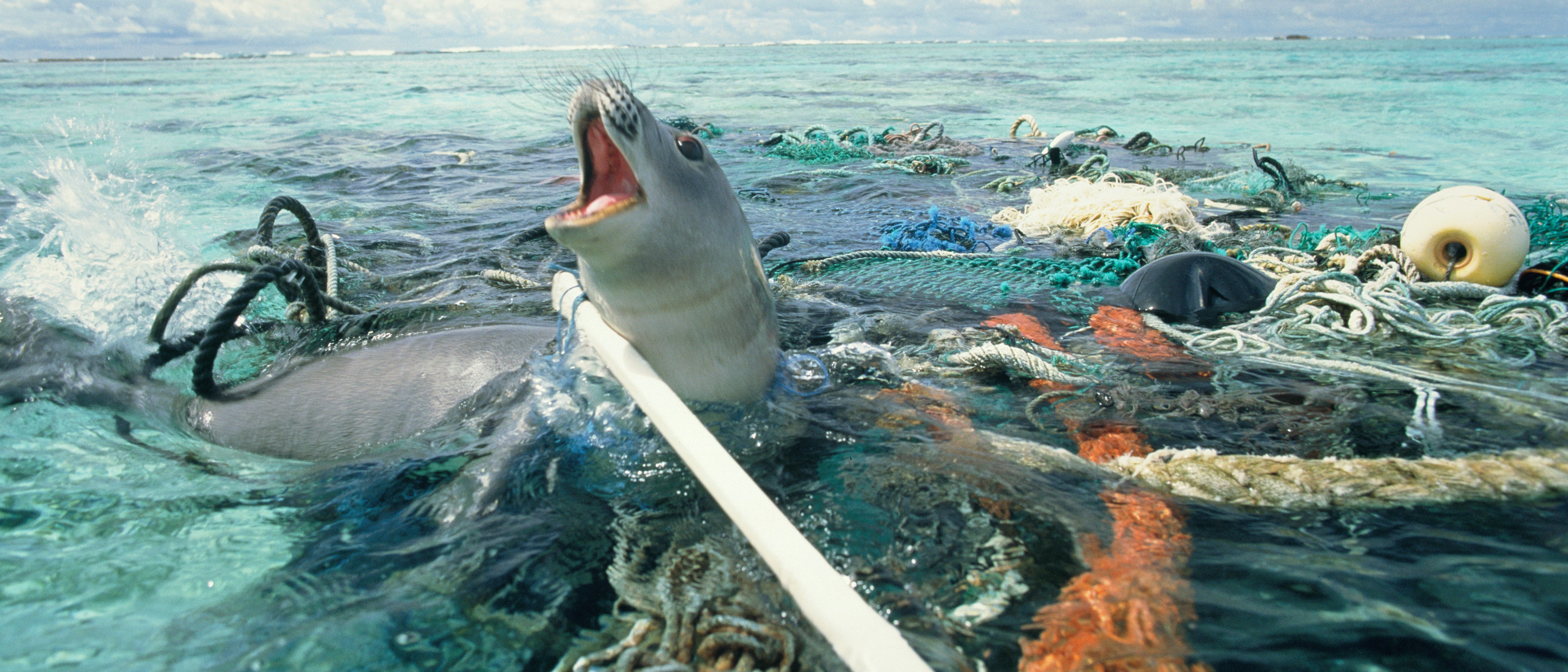
image from https://www.plasticsoupfoundation.org/en/friends-of-psf/
- 8 millions metric tons of plastic dumped into the ocean every year
- 50% of plastic is only used once then thrown away
- every minute a truck full of plastic is dumped into the ocean
- By 2050 there will be more plastic in our oceans than fish, by weight
- Plastic can be found as deep as 11km in our oceans
1. Research Report:
- Abstract Art originated in Europe in the late 19th Century, early 20th Century
- It emerged due to the decline in appreciation of Realism among Avante-Garde artists.
- Abstract art allowed for lucid analysis and meaning via lines, colours and shapes that were not yet recognised in art at the time.
- Abstraction opened a gateway to many forms of art such as Impressionism and Expressionism.
- It focused on few key formal elements to manipulate and distort realistic representation.
- As a result of the first and second World Wars, Many of Europes leading artists had to flea their homes for Americas safe haven.
(Somshun Khan – 2011) Useum.org – History of Abstract Art
Wassily Kandinsky:
- Born 16th December 1866, Moscow
- One of the earliest and most influential abstract painters of the 20th Century
- Kandinsky wanted to evoke sound through sight and create the painterly equivalent of a symphony
- He removed all recognisable subjects and objects from his art and achieved a new pictorial form of music
- Kandinsky believed to have had synaesthesia, a harmless condition that allows a person to appreciate sounds, colours or words with 2 or more senses simultaniously
(https://www.telegraph.co.uk/art/artists/wassily-kandisnky-who-was-he/)
Christoph Niemann:
The contemporary artist i have chosen is German born illustrator, graphic designer and animator, Christoph Niemann.
Niemann studied at the State Academy of Fine Art in Stuttgart. After his studies in Germany he moved to New York in 1997, where he quickly grew to be one of the most successful illustrators of the 21st Century, with work appearing on the covers of The New Yorker, WIRED and The New York Times Magazine, as well as writing and designing his own series of children’s books.
Elements & Principles of Design
 This is the elements and principles of design.
The Journey Begins
Thanks for joining me!
Good company in a journey makes the way seem shorter. — Izaak Walton

 Paul Quinlan Graphic Design